




.webp)
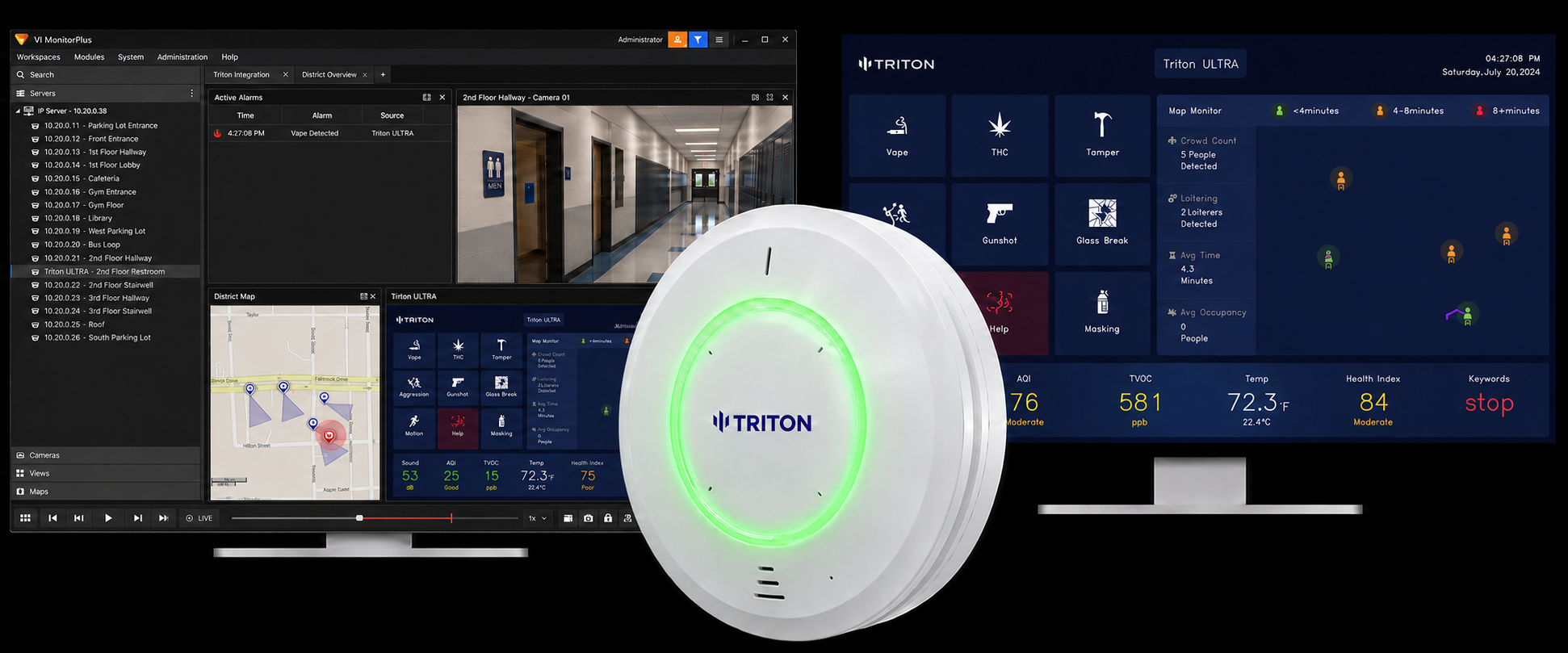
Triton ULTRA connects to i-PRO VideoInsight 7 or 8 through direct HTTP events or a Triton Cloud connection with camera bookmarks and Evidence Room. Staff can connect sensor detections to nearby camera views and review room activity alongside footage from outside the entrance.
Operators gain context for responding to an alert, while administrators can investigate afterward using the recordings and sensor information available for the incident. The Cloud connection brings these together in Evidence Room.
Direct connection from Triton ULTRA
How it works: ULTRA sends HTTP event messages to VideoInsight. Rules Manager connects detections with configured responses, including a live camera view near the sensor.
Event review: The direct setup supports rule-driven responses but does not currently support saved bookmarks for ULTRA events. Use the Cloud connection when camera bookmarks and Evidence Room are needed.
Triton Cloud + VideoInsight
Camera association: The Bookmark Camera ID identifies the nearby camera for incident footage. The Event Camera ID identifies the sensor’s RTSP occupancy stream recorded as a camera in VideoInsight.
Alert workflow: Configure the VideoInsight event rules to match the categories sent by Triton Cloud. Categories are case-sensitive, so the rule must use the exact value specified in the guide.
Evidence Room: With the relevant mappings and recording configured, Evidence Room brings available camera footage, occupancy recordings, and sensor readings together for review in Triton Cloud.
Monitor live activity and investigate incidents
ULTRA’s RTSP occupancy stream can be displayed in VideoInsight between events. During an investigation, the room view and nearby camera provide complementary context, while sensor metrics help explain the detection.
Before you start: Use the guide for VideoInsight 7 or 8 and your chosen connection. Verify camera IDs, event rules, and recording settings, then test the live response and the information available for incident review.
Frequently Asked Questions
What differs between the direct and Cloud connections?
The direct HTTP setup activates VideoInsight rules and camera views. Triton Cloud adds camera bookmarks and Evidence Room for reviewing footage with sensor information.
What are the two camera IDs used for?
The Bookmark Camera ID identifies the nearby camera. The Event Camera ID identifies the sensor’s occupancy stream recorded as a camera in VideoInsight.
Why is the event category case-sensitive?
The Enhanced System Input rule must match the category sent by Triton Cloud. For example, use THC rather than thc.
Which VideoInsight versions are covered?
The guides cover VideoInsight 7 and 8. Use the instructions for your deployment and confirm any version-specific requirements during setup.
Can staff view occupancy between events?
Configure the sensor’s RTSP occupancy stream in VideoInsight for live viewing alongside camera feeds.
Resources
i-PRO VideoInsight (On-Prem) – Triton ULTRA Integration Guide — full setup guide for HTTP event forwarding on VideoInsight 7.x and 8.x.
i-PRO VideoInsight 8 – Triton Cloud Integration Guide — full setup guide for Triton Cloud + Evidence Room.
i-PRO VideoInsight 7 – Triton Cloud Integration Guide — full setup guide for Triton Cloud + Evidence Room.
Contact us if you're running a mixed environment or aren't sure which path fits.
Compare Triton ULTRA integration options across video management, access control, intercoms, and staff alerts.

